 Tendersight Leads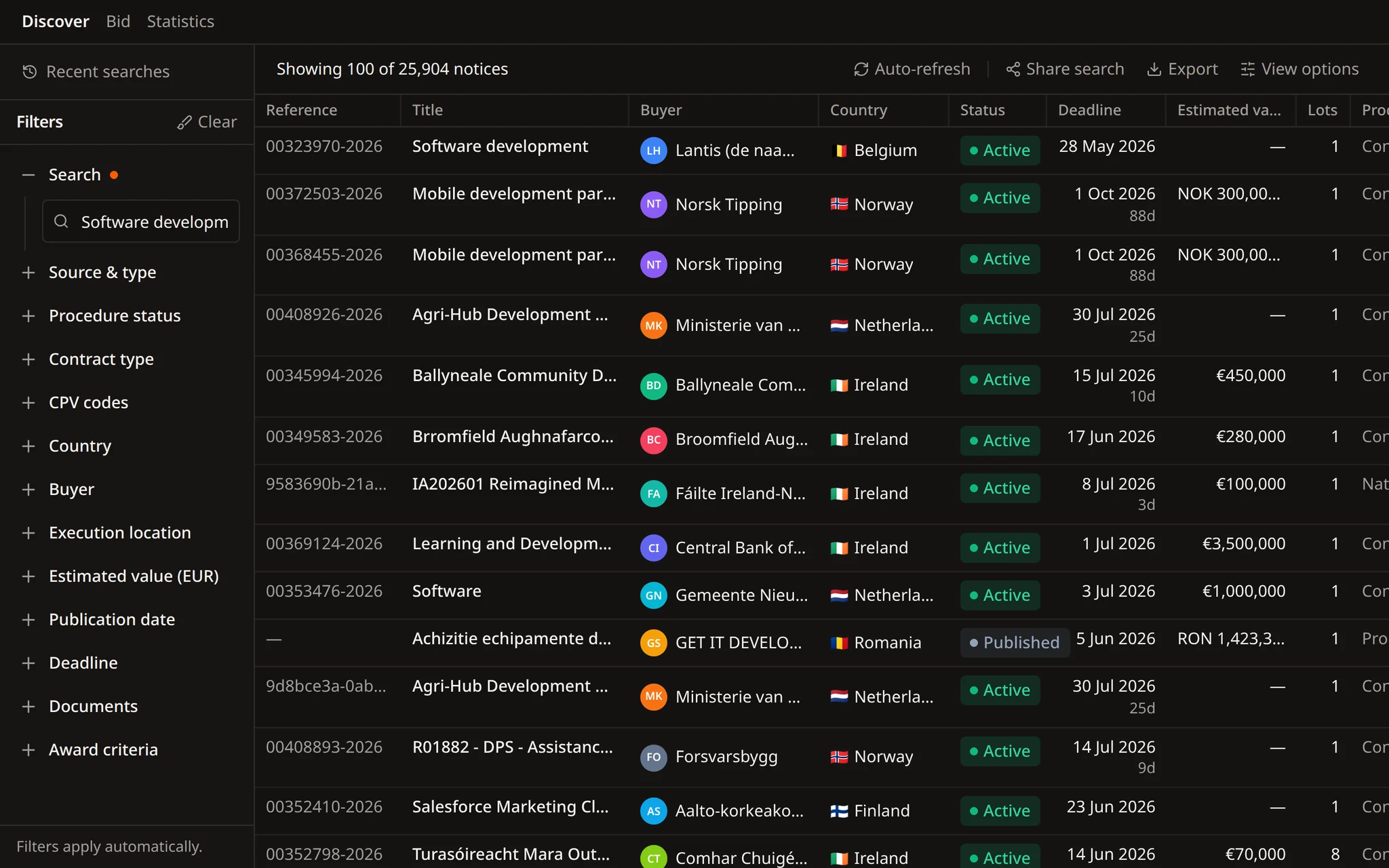
The facts stay in the results
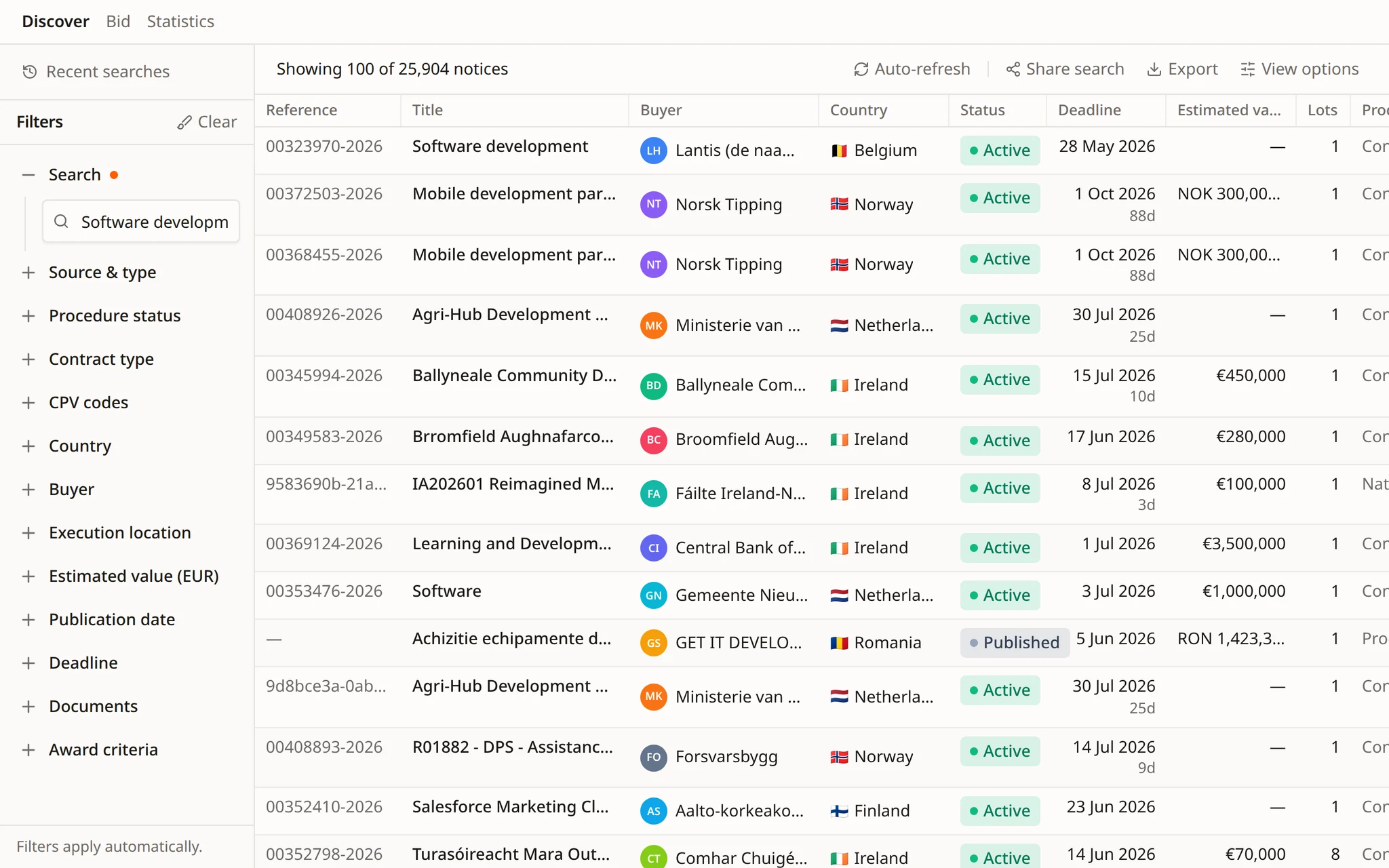
Buyer, country, status, deadline, estimated value and lots, visible before you open a notice.


Find opportunities, choose which ones to pursue, prepare the response, and track the deadline.
Search notices, buyers, and CPV codes. Save useful searches and keep deadlines in view.
Improve text, translate it, remove sensitive details, or fill a template, then review each change in the same Word file.
Get notified when a relevant tender appears. Check the details, keep deadlines in view, and decide what needs attention next.
 Tendersight Leads
Search notices, buyers and CPV codes. Or describe your work to Flow, the Tendersight agent, and it builds the search, the alert and the schedule.
Notices from 28+ official sources
Contracting authority and company statistics
Searches that run on a schedule
Describe the work once. Flow turns it into a search, an alert and a schedule.
Flow picks the CPV scope, applies the filters and saves the alert after you confirm. Scheduled runs summarise the new notices, and your team decides which ones to pursue.
Combine them in the filter panel, or name them in a sentence and Flow applies them.
Keep the notices that are still open for offers and set aside the rest.
Filter by the contracting authority, where it sits, or where the contract is performed.
Supplies, services or works, narrowed to the CPV codes your company actually bids on.
Set a value range in euros. Values published in other currencies are converted.
Keep recent notices and drop the ones that close before your team could respond.
Show only notices that publish their documents or award criteria, so the file can be read today.
From a plain description of your work to an alert and a scheduled search. Every step is shown, and alerts change only after you confirm.
Tell Flow what you deliver, in your own words. It picks the CPV codes that cover the work and shows which ones it chose.
Country, place of performance, contract type, value range and deadline. Flow runs the search across 28+ official sources and returns the list.
Flow creates, updates and deletes alert rules from the conversation. Each change appears as a confirmation card first.
Ask about a tender and Flow reads its documents and award criteria, then answers with the source.
A scheduled task runs the search every weekday, or on the days you choose, and summarises what is new. Each run opens its own conversation.
Flow reads contracting authority and company statistics: frequent CPV codes, CPV market share, regional coverage, main competitors and participation over time.
Save it, share the same view, export the list, or have Flow draft the question a notice leaves open.
Buyer, country, status, deadline, estimated value and lots, visible before you open a notice.
When a notice leaves a condition open, Flow drafts the clarification request. Your team reviews it and sends it.
Keep the criteria you use often and reopen them without rebuilding every filter.
Give a colleague the same filtered list instead of a set of search instructions.
Take the results into the spreadsheet or workflow your team already uses.
Examples of requests from sales teams, bid managers and business development leads.
Find open tenders for school catering in Portugal and Spain with a submission deadline after 1 December.
Which CPV codes cover road marking and traffic signage works? Use them to search Romania and Bulgaria.
Create an alert for IT service desk tenders in Belgium above €500,000 that publish their award criteria.
Show the contracting authority statistics for the buyer of the metro station tender and the CPV codes it buys most.
Open the metro station tender and tell me whether consortia and subcontractors are allowed, with the page.
Every Monday at 08:00, search new notices in our CPV scope and list the ones that close in more than 20 days.
In a demo we set up your search, alert and scheduled task with Flow, for the markets you sell into.
Public notices, contracting authorities and CPV codes from 28+ official sources across 27 EU countries. Narrow the results by notice type, procedure status, country, buyer, CPV code, estimated value, dates, documents and award criteria.
Describe what you bid for and Flow, the Tendersight agent, picks the CPV codes, runs the search with your filters and creates the alert once you confirm. It can also read a notice's documents and award criteria and answer questions about them.
Yes. A scheduled task has a name, an instruction in plain words and a schedule, such as every weekday at 07:30. Each run opens its own conversation with the result, and the run history shows which runs succeeded or need input.
Yes. Flow reads contracting authority statistics and company statistics, including frequent CPV codes, CPV market share, regional coverage, main competitors and participation over time.
Yes. Save the search, share the same filtered view with a colleague, or export the results into the spreadsheet or workflow your team already uses.
Start free, describe what you bid on and ask Flow to set up the alert.